
投放IG廣告建議每月最少新台幣6,000元。如果有經營FB,建議也同步在FB臉書上進行廣告投放。
IG廣告費用怎麼抓?能有多少成果?
適合對象 | 狀況 | 建議金額(月) | 成效(點擊) |
新創企業、個人 | 預算有限,試水溫 | 台幣6千至1萬 | 流量1千-2千左右 |
中小企業 | 小規模預算 | 台幣1萬至3萬 | 流量3千-5千左右 |
中大型企業 | 行銷專用整包預算 | 台幣3萬-10萬 | 流量1萬-2萬左右 |
IG投放廣告費用對象與成效整理表
因為根據Meta官方的規定每天廣告金額最少50元 一個月大約是1,500元
而我自己的建議則是每個月抓台幣6,000-10,000元
因為如果只投放1,500元能接觸到的用戶實在有限
這會導致廣告資料會不完整以及Meta無法好好的學習出價策略
導致影廣告投放的成效不佳
甚至如果要做廣告的A/B測試
預算太低會沒有辦法讓A/B測試獲得足夠多的數據
讓AB測試變成做白工
總結上述,每個月建議的最低廣告金額約為6,000-10,000元為佳
而如果有能力或是預算較充足的業者,則可以往上至10,000-30,000元
而我合作過資本較大的企業,廣告預算則都是每個月幾十萬在跑的
延伸閱讀:FB廣告投放費用多少?該怎麼抓?
評估IG廣告的成效
.container { width: 100%; max-width: 900px; }
.calculator-card { background-color: #FFF9E6; border-radius: 20px; box-shadow: 0 10px 30px rgba(90, 75, 51, 0.1); padding: 30px; transition: transform 0.3s ease, box-shadow 0.3s ease; }
.calculator-card:hover { transform: translateY(-5px); box-shadow: 0 15px 35px rgba(90, 75, 51, 0.15); }
h1 { color: #5A4B33; text-align: center; margin-bottom: 10px; font-size: 28px; }
.subtitle { text-align: center; color: #8A7B63; font-size: 16px; margin-bottom: 25px; }
.input-section { display: grid; grid-template-columns: repeat(auto-fit, minmax(200px, 1fr)); gap: 20px; margin-bottom: 30px; }
.input-group { display: flex; flex-direction: column; }
label { color: #5A4B33; margin-bottom: 8px; font-weight: 600; font-size: 14px; }
input { background-color: white; border: 2px solid #FFD24C; border-radius: 10px; padding: 10px 15px; font-family: inherit; font-size: 16px; color: #5A4B33; transition: all 0.3s ease; }
input:focus { outline: none; border-color: #FFB400; box-shadow: 0 0 0 3px rgba(255, 210, 76, 0.3); }
input:hover { border-color: #FFB400; }
.result-section { display: flex; gap: 30px; margin-bottom: 30px; }
.honey-pot-container { flex: 0 0 170px; display: flex; align-items: center; justify-content: center; }
.honey-pot { position: relative; width: 140px; height: 190px; transform-style: preserve-3d; transition: transform 0.5s ease; }
.honey-pot:hover { transform: rotate3d(0, 1, 0, 15deg); }
.pot-top { position: absolute; top: 0; left: 20px; width: 100px; height: 20px; background-color: #FFD24C; border-radius: 50% 50% 0 0; z-index: 2; box-shadow: 0 -2px 5px rgba(0, 0, 0, 0.1); }
.pot-body { position: absolute; top: 20px; left: 10px; width: 120px; height: 160px; background-color: rgba(255, 255, 255, 0.7); border: 3px solid #FFD24C; border-radius: 15px 15px 70px 70px; overflow: hidden; box-shadow: 0 5px 15px rgba(0, 0, 0, 0.1); backdrop-filter: blur(5px); -webkit-backdrop-filter: blur(5px); }
/* Add honeycomb pattern to jar */ .pot-body::before { content: ''; position: absolute; top: 0; left: 0; right: 0; bottom: 0; background-image: radial-gradient(circle at 50% 50%, transparent 8px, rgba(255, 210, 76, 0.1) 8px, rgba(255, 210, 76, 0.1) 10px, transparent 10px); background-size: 25px 25px; z-index: 0; opacity: 0.5; }
.honey-level { position: absolute; bottom: 0; left: 0; width: 100%; height: 0%; background: linear-gradient(to bottom, #FFD24C, #FFA600); transition: height 1s ease-out, opacity 0.5s ease; border-radius: 0 0 67px 67px; }
/* Add shine effect to honey */ .honey-level::after { content: ''; position: absolute; top: 0; left: 0; right: 0; bottom: 0; background: linear-gradient(135deg, rgba(255, 255, 255, 0.3) 0%, rgba(255, 255, 255, 0) 50%, rgba(255, 255, 255, 0.1) 100%); border-radius: 0 0 67px 67px; }
.bee { position: absolute; font-size: 24px; top: 10px; right: 0; transition: all 0.5s cubic-bezier(0.68, -0.55, 0.265, 1.55); z-index: 3; filter: drop-shadow(0 2px 3px rgba(0, 0, 0, 0.2)); text-shadow: 0 2px 5px rgba(0, 0, 0, 0.2); cursor: pointer; }
.bee:hover { transform: scale(1.2) rotate(10deg); }
.metrics { flex: 1; display: grid; grid-template-columns: repeat(2, 1fr); gap: 15px; }
.metric-item { background-color: white; padding: 15px; border-radius: 15px; box-shadow: 0 4px 10px rgba(90, 75, 51, 0.05); transition: transform 0.3s ease; }
.metric-item:hover { transform: translateY(-3px); }
.metric-item.highlight { background-color: #FFD24C; color: #5A4B33; }
.metric-label { font-size: 14px; font-weight: 600; margin-bottom: 5px; color: #5A4B33; }
.metric-value { font-size: 20px; font-weight: 700; color: #5A4B33; }
.tips-section { margin-top: 20px; }
.tip { background-color: rgba(255, 210, 76, 0.2); border-left: 4px solid #FFD24C; padding: 15px; border-radius: 0 10px 10px 0; }
.tip p { color: #5A4B33; font-size: 14px; line-height: 1.5; }
.educational-tips { margin-top: 15px; display: grid; grid-template-columns: repeat(auto-fit, minmax(250px, 1fr)); gap: 15px; }
.tip-item { background-color: rgba(255, 255, 255, 0.6); border-radius: 8px; padding: 12px; box-shadow: 0 2px 6px rgba(90, 75, 51, 0.05); transition: transform 0.2s ease; }
.tip-item:hover { transform: translateY(-3px); box-shadow: 0 5px 10px rgba(90, 75, 51, 0.1); }
.tip-item h4 { color: #5A4B33; margin-bottom: 8px; font-size: 15px; border-bottom: 2px solid rgba(255, 210, 76, 0.5); padding-bottom: 5px; }
.tip-item p, .tip-item ul { color: #5A4B33; font-size: 13px; line-height: 1.5; }
.tip-item ul { padding-left: 20px; margin-top: 5px; }
.tip-item li { margin-bottom: 4px; }
/* Tooltip styles for enhanced educational experience */ [title] { position: relative; cursor: help; }
[title]:hover::before { content: attr(title); position: absolute; bottom: 100%; left: 50%; transform: translateX(-50%); background-color: #FFD24C; color: #5A4B33; padding: 5px 10px; border-radius: 5px; font-size: 12px; white-space: nowrap; font-weight: normal; box-shadow: 0 4px 8px rgba(0, 0, 0, 0.1); z-index: 10; pointer-events: none; opacity: 0; animation: fadeIn 0.3s forwards; }
@keyframes fadeIn { from { opacity: 0; transform: translate(-50%, 10px); } to { opacity: 1; transform: translate(-50%, 0); } }
@keyframes flyAround { 0% { transform: translate(0, 0) rotate(0deg); } 25% { transform: translate(20px, -15px) rotate(10deg); } 50% { transform: translate(-10px, -25px) rotate(-5deg); } 75% { transform: translate(-25px, -5px) rotate(-10deg); } 100% { transform: translate(0, 0) rotate(0deg); } }
/* Better bubble animation */
.fly-animation { animation: flyAround 4s infinite ease-in-out; }
.bubble { position: absolute; background-color: rgba(255, 255, 255, 0.6); border-radius: 50%; animation: bubbleRise 3s ease-in forwards; z-index: 1; box-shadow: inset 0 0 4px rgba(255, 255, 255, 0.8), 0 0 2px rgba(255, 182, 0, 0.4); }
/* Add shine to bubble */ .bubble::after { content: ''; position: absolute; top: 20%; left: 20%; width: 30%; height: 30%; background-color: rgba(255, 255, 255, 0.8); border-radius: 50%; }
@keyframes bubbleRise { 0% { transform: translateY(0) scale(1); opacity: 0.7; } 30% { transform: translateY(-30px) scale(1.1); opacity: 0.8; } 70% { transform: translateY(-70px) scale(0.8); opacity: 0.7; } 100% { transform: translateY(-100px) scale(0); opacity: 0; } }
/* Responsive design */ @media (max-width: 768px) { .result-section { flex-direction: column; align-items: center; } .metrics { width: 100%; } .honey-pot-container { margin-bottom: 20px; } }
@media (max-width: 480px) { .metrics { grid-template-columns: 1fr; } .calculator-card { padding: 20px; } h1 { font-size: 24px; } .educational-tips { grid-template-columns: 1fr; } /* Adjust tooltip for mobile */ [title]:hover::before { width: 200px; white-space: normal; line-height: 1.3; } }
/* Bee tooltip styles */ .bee-tooltip { position: absolute; top: -40px; right: -120px; width: 200px; background-color: #FFD24C; color: #5A4B33; padding: 10px; border-radius: 8px; font-size: 14px; text-align: center; box-shadow: 0 4px 10px rgba(0, 0, 0, 0.15); z-index: 100; opacity: 1; transition: opacity 0.5s ease; pointer-events: none; }
.bee-tooltip::after { content: ''; position: absolute; bottom: -8px; left: 50px; width: 0; height: 0; border-left: 8px solid transparent; border-right: 8px solid transparent; border-top: 8px solid #FFD24C; }
/* Loader for delayed loading */ .calculator-placeholder { background-color: #FFF9E6; border-radius: 20px; box-shadow: 0 10px 30px rgba(90, 75, 51, 0.1); padding: 30px; display: flex; flex-direction: column; align-items: center; justify-content: center; min-height: 400px; }
.loading-bee { font-size: 36px; margin-bottom: 20px; animation: flyAround 2s infinite ease-in-out; }
.placeholder-text { color: #5A4B33; font-weight: 600; }
計算並視覺化您的廣告投資回報率 根據ROI表現,您可以識別出最有效的廣告管道,並相應地調整預算分配。 廣告投資計算器
如何提高ROI?
廣告預算配置
document.addEventListener('DOMContentLoaded', function() { // Show loading indicator const container = document.querySelector('.container'); // Implement delayed loading for demonstration setTimeout(() => { initCalculator(); }, 300); });
function initCalculator() { // Get input elements const budgetInput = document.getElementById('budget'); const cpcInput = document.getElementById('cpc'); const convRateInput = document.getElementById('convRate'); const aovInput = document.getElementById('aov'); // Get output elements const clicksOutput = document.getElementById('clicks'); const conversionsOutput = document.getElementById('conversions'); const revenueOutput = document.getElementById('revenue'); const roiOutput = document.getElementById('roi'); const honeyLevel = document.getElementById('honey-level'); const bee = document.getElementById('bee'); // Input elements array const inputs = [budgetInput, cpcInput, convRateInput, aovInput]; // Add event listeners to all inputs inputs.forEach(input => { // Clear input field when focused input.addEventListener('focus', function() { // Store current value in a data attribute this.dataset.previousValue = this.value; // this.value = ''; }); // Restore previous value if left empty input.addEventListener('blur', function() { if (this.value === '') { this.value = this.dataset.previousValue || '0'; calculateResults(); } // Additional validation for conversion rate if (this.id === 'convRate') { const value = parseFloat(this.value); if (value > 100) { this.value = '100'; calculateResults(); } } }); // Calculate on input input.addEventListener('input', calculateResults); }); // Initial calculation calculateResults(); // Function to calculate results function calculateResults() { // Get input values and ensure they're valid numbers const budget = Math.max(0, parseFloat(budgetInput.value) || 0); const cpc = Math.max(0.01, parseFloat(cpcInput.value) || 0); const convRate = Math.min(100, Math.max(0, parseFloat(convRateInput.value) || 0)); const aov = Math.max(0, parseFloat(aovInput.value) || 0); // Update input fields with sanitized values (prevents invalid inputs) budgetInput.value = budget; cpcInput.value = cpc; convRateInput.value = convRate; aovInput.value = aov; // Perform calculations const clicks = Math.floor(budget / cpc); const conversions = Math.round((clicks * convRate) / 100); const revenue = conversions * aov; const roi = budget > 0 ? ((revenue - budget) / budget * 100) : 0; // Update output elements clicksOutput.textContent = formatNumber(clicks); conversionsOutput.textContent = formatNumber(conversions); revenueOutput.textContent = formatNumber(revenue) + ' 元'; roiOutput.textContent = formatNumber(roi) + '%'; // Update honey jar animation updateHoneyJar(roi); // Create bubbles if ROI is positive if (roi > 0) { createBubbles(roi); if (!bee.classList.contains('fly-animation')) { bee.classList.add('fly-animation'); } } else { bee.classList.remove('fly-animation'); } } // Function to update honey jar based on ROI function updateHoneyJar(roi) { // Calculate honey level percentage (between 0% and 100%) let levelPercentage; if (roi = 200) { levelPercentage = 100; } else { // Scale ROI from 0-200 to 0-100 levelPercentage = (roi / 2); } // Update bee position based on ROI if (roi > 0) { // Position the bee higher as ROI increases const beeTopPosition = Math.max(10, 70 - levelPercentage/2); bee.style.top = beeTopPosition + 'px'; // Add a special effect when ROI is very high (>100%) if (roi > 100) { document.querySelector('.honey-pot').style.transform = 'rotate3d(0, 1, 0, 5deg)'; } else { document.querySelector('.honey-pot').style.transform = 'none'; } } else { bee.style.top = '70px'; // Lower position when ROI is negative } // Update honey level height honeyLevel.style.height = levelPercentage + '%'; // Set color based on ROI if (roi { if (document.querySelector('.honey-level').offsetHeight > 0) { const bubble = document.createElement('div'); bubble.classList.add('bubble'); // Random bubble size between 5-12px const size = Math.random() * 7 + 5; bubble.style.width = `${size}px`; bubble.style.height = `${size}px`; // Random horizontal position within the pot const leftPos = Math.random() * 80 + 10; bubble.style.left = `${leftPos}%`; // Set bottom position to just above the honey level const honeyHeight = document.querySelector('.honey-level').offsetHeight; bubble.style.bottom = `${Math.random() * 20 + honeyHeight}px`; // Add bubble to pot and remove after animation completes potBody.appendChild(bubble); setTimeout(() => { potBody.removeChild(bubble); }, 3000); } }, i * 300); // Stagger bubble creation } } // Helper function to format numbers with commas function formatNumber(num) { // No decimal places for whole numbers, 2 decimal places otherwise if (Math.floor(num) === num) { return num.toLocaleString('en'); } else { return num.toFixed(2).replace(/\d(?=(\d{3})+\.)/g, '$&,').replace(/\.00$/, ''); } } // Add a fun interaction with the bee bee.addEventListener('click', function() { // Make the bee do a quick dance this.style.animation = 'none'; setTimeout(() => { this.style.animation = 'flyAround 2s ease-in-out'; setTimeout(() => { this.style.animation = this.classList.contains('fly-animation') ? 'flyAround 4s infinite ease-in-out' : 'none'; }, 2000); }, 10); // Show a random tip const tips = [ "提高轉換率是提高ROI的關鍵!", "嘗試降低CPC來提高點擊量。", "高客單價能迅速提升ROI。", "平衡預算分配是成功的關鍵。", "定期分析ROI,調整廣告策略。" ]; // Create a tooltip const tooltip = document.createElement('div'); tooltip.className = 'bee-tooltip'; tooltip.textContent = tips[Math.floor(Math.random() * tips.length)]; document.querySelector('.honey-pot-container').appendChild(tooltip); // Remove tooltip after 3 seconds setTimeout(() => { tooltip.style.opacity = '0'; setTimeout(() => tooltip.remove(), 500); }, 3000); }); }
IG廣告是什麼?會出現在哪些地方?
有時候滑著IG,突然跳出陌生人的限動或是貼文
並且在帳號名稱下方標示著兩個子:“贊助”
那這100%就是IG的廣告了
整理IG廣告主要會出現在三種位置:
- 限時動態:滑限動會出現,左上角會標示“贊助”,表示是廣告
- 貼文:滑IG主頁會出現,一樣會標示“贊助”
- 探索:滑探索的時候,會出現一整個大框框呈現廣告圖片
當我們要投放廣告的時候
一樣可以選擇要在這三種位置的哪些地方(版位)投放廣告
如果我們付錢給IG投放廣告
別人看到你的貼文時一樣會出現“贊助”兩個字
如何投放廣告,可以出現在限動嗎?
投放IG廣告主要有兩種方式:
- 加強推廣貼文:簡單便利,但是可設定資料少,因此不推薦
- 使用Meta廣告管理員:使用廣告管理員頁面,可設定較多廣告細節資訊
只有使用Meta廣告管理員才能夠選擇詳細的廣告顯示位置(版位)
下面幫大家詳細說明兩種IG廣告的投放方法:
IG廣告投放方法一:使用加強推廣(不推薦)
如果想要使用加強推廣貼文
只需要在貼文下方點選“加強推廣貼文”
設定每天想要投放多少金額就完成了
非常簡單直覺
如果想看廣告相關成效數據
可以到Instagram商務套件管理工具
查看曝光、點擊等等廣告數據
但是這些數據一樣沒有Meta廣告管理員的指標來得多和完整
IG廣告投放方法二:使用Meta廣告管理員
首先找到Meta廣告管理員並且進入頁面
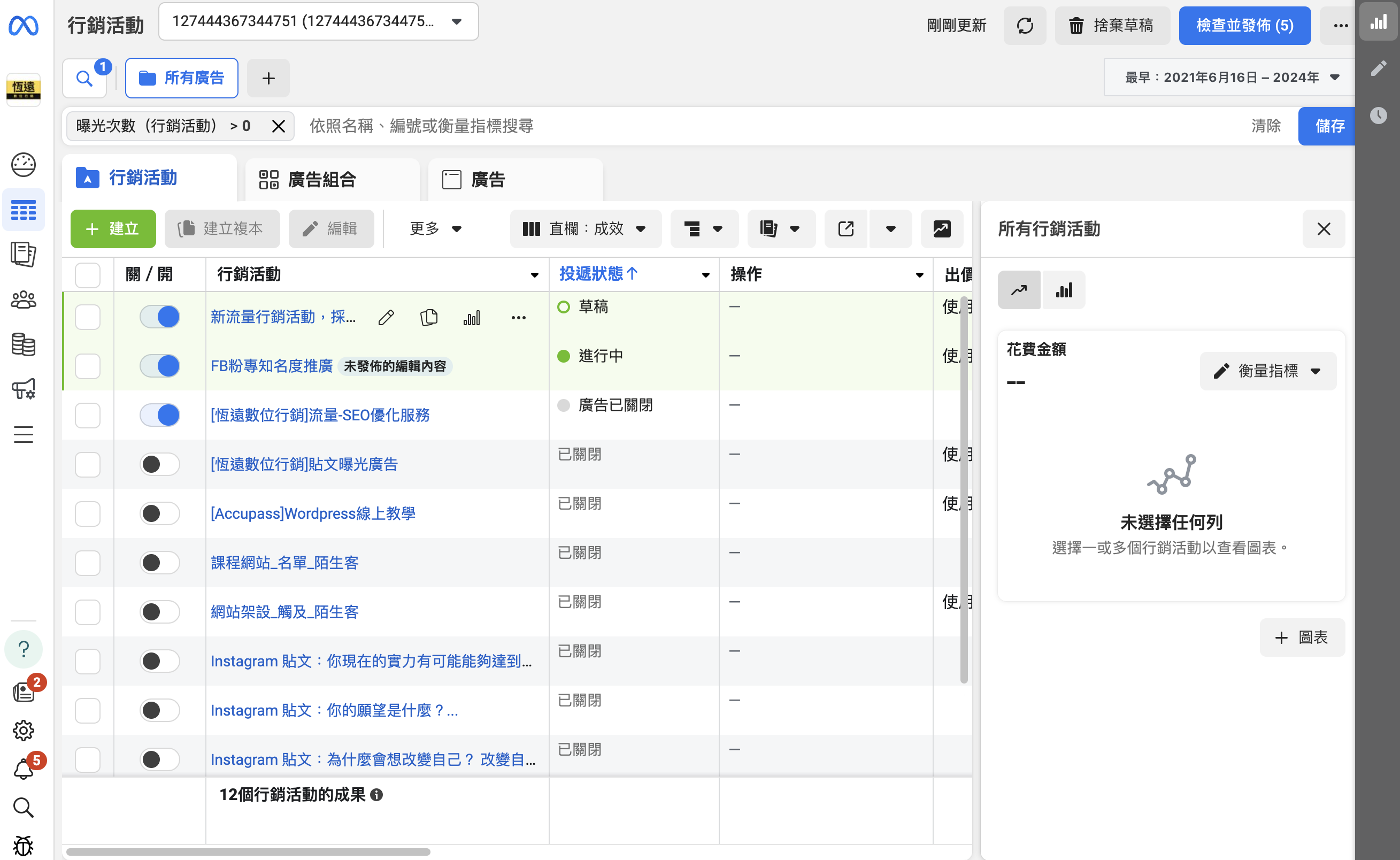
左上角有綠色的建立按鈕

這邊選擇流量作為我們的廣告活動目標

這裡一定要選擇手動流量行銷活動才能進行更多設定
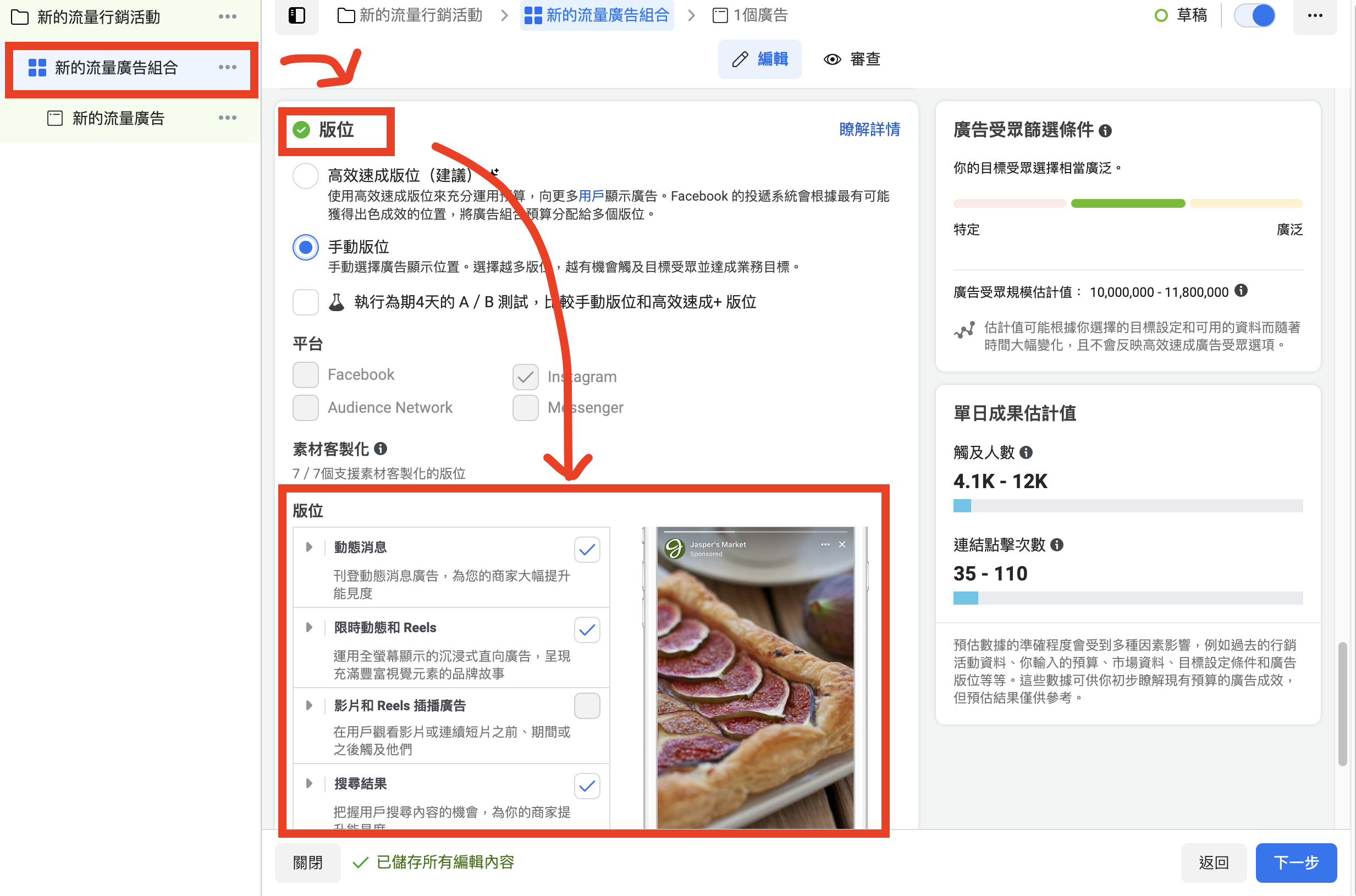
依序填寫行銷活動、廣告組合、廣告這三個資料內容
值得注意的是,欲投放廣告位置設定在第二個層級-廣告組合中進行設定
這邊找到Instagram平台,選擇想要曝光廣告的版位就可以囉
IG廣告投放技巧,這樣做更簡單
IG廣告主要是“圖片”取勝
因此對於圖片的要求會比FB來要來得更高
在廣告圖片中一定要加入三個元素:
- 廣告標題:一句吸引人的標題
- 廣告副標題:補充說明
- 行動呼籲:呼籲觀眾立刻行動
進行A/B測試:A/B測試是一種常見的廣告優化方法。其實可以想像一下,不可能一種圖片用到底,我們身而為人還是需要不同角度的刺激,好比說有些人喜歡看消費者回饋再做選擇、或是限量新品搶購等等,這些都是可以測試的手段。
持續監控與優化:廣告投放後,應隨時檢查數據,分析其表現,例如點擊率、互動率、轉換率等。對表現不佳的廣告及時進行調整,無論是改變素材、修改文案,還是重新定位受眾,記得一次就改一種就好。然後放大的概念也很重要,甚麼是成效好的素材?應該要立即放大來增加營收。
多元廣告形式:使用類型的廣告像是如圖片+文字、影片廣告或限時動態廣告,這樣可以增加吸引力並涵蓋不同的受眾喜好。例如,短影片廣告在動態內容中有時會比靜態圖片更能消費者注意,讓他停留更久。
對於IG來說
廣告上的文字非常重要
圖片素材的品質要求也會更高
建議大家可以多參考廣告管理員
找出最適合自己IG廣告風格。
另外,IG其實可以多嘗試短影音
短影音不是只有短而已
內容要緊湊,然後掌握每一個就是一個重點
如果覺得重點太多,那就剪成很多隻來用。
如何製作吸引人的IG廣告素材?
- 多多使用影音格式:IG是視覺張力的社群平台,因此廣告素材要往視覺張力這塊。確保圖片和影片清晰、具吸引力,並能表達品牌的核心價值。無論是產品還是其他類型的素材,可以確保大家看到的不會過於花俏,維持品牌專業度。
- 簡潔有力的文案:IG的使用者通常不會花太多時間閱讀冗長的文字,文案要偏向短、精,能在短時間內抓住受眾的注意力。強調產品的獨特賣點,並搭配明確的行動呼籲(如“立即購買”、“點擊查看更多”)讓他們看完立馬行動。
- 互動元素與內容的加入:善用IG的互動功能,如限時動態中的投票、問答或滑動條等工具,這樣可以有效提升互動率,增強品牌與消費者之間的連結。但記得不要辦太多抽獎的活動,會有很多人頭帳戶,降低帳號的觸及率。使用者與廣告互動後,我們也可以更深入了解大家的偏好和需求,回來調整我們的廣告策略。
IG廣告提交後,要注意什麼?多久會通過審核
IG廣告發佈之後,通常24小時會通過審核
如果是新帳號可能會需要比較久一點的時間
值得一提的是
新廣告帳號發布的內容一定要特別遵守IG廣告平台規範
涉及金錢、醫療、政治、賭博等內容千萬不要發
尤其是新的廣告帳號通常都會由專人審核
被抓到違規內容廣告帳號可能會被凍結、甚至永久封鎖都有可能
IG廣告如何設定付款方式,怎麼扣錢?
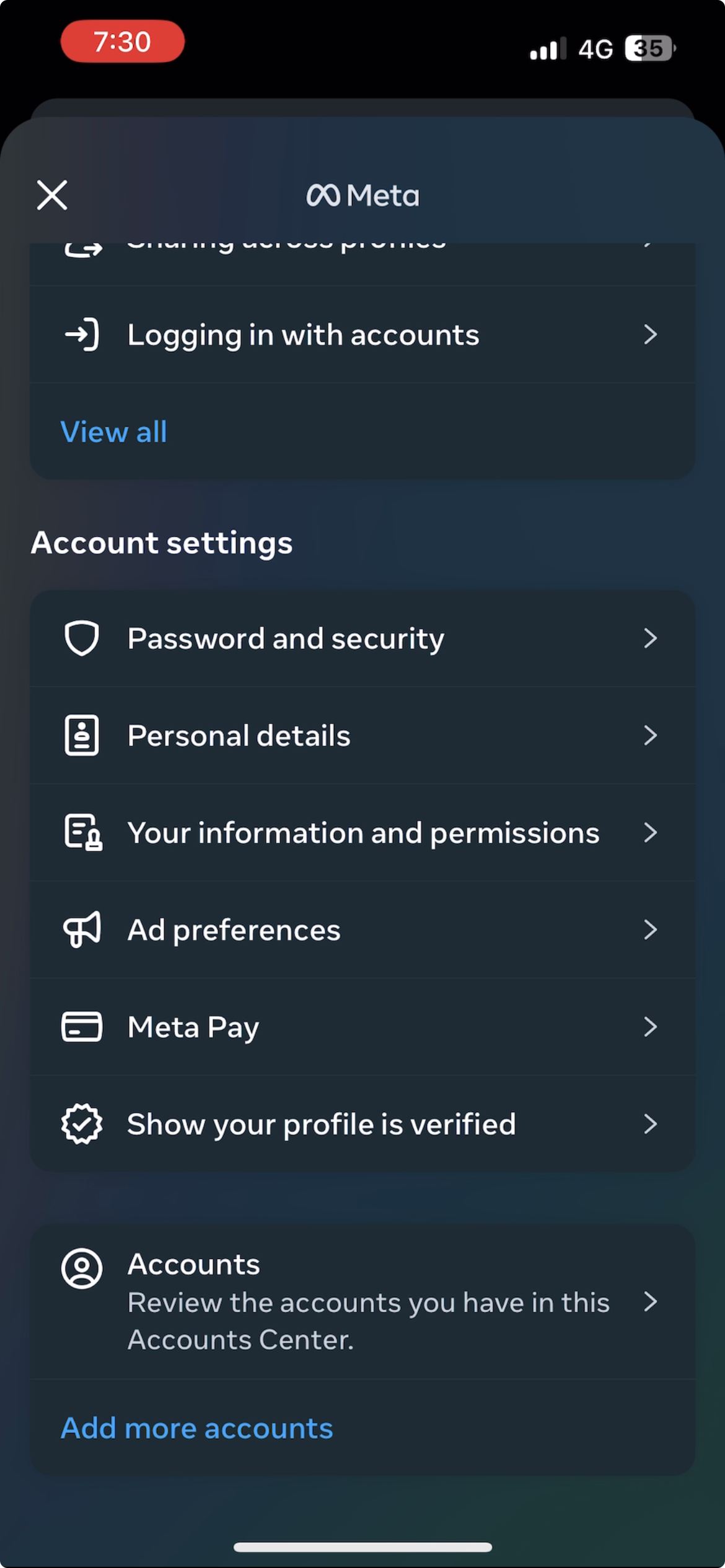
根據Meta官方文件,你可以直接透過以下步驟進行線上付款:
- 前往個人主頁,並點按右上角的選單圖示(三條橫線)。
- 點擊帳號中心
- 點按廣告付款(Meta Pay)。
- 這裡就可以綁定信用卡,當廣告金額達到門檻後,Meta就會透過這裡的付款資料自動刷卡
補充:如果卡刷不過,Meta會寄信提醒你付款,並且在成功付款前所有的廣告都會暫停
IG廣告成效怎麼看,會不會被多收錢?
說到IG成效,還是建議大家到Meta廣告管理員裡面看

推薦大家看的指標包括:
- 成果:根據你的目標而定,可能是觸及也可能是點擊
- 觸及人數:實際上你的廣告讓幾個人看到
- 曝光次數:實際上你的廣告出現了幾次(一人可能曝光2次)
- 花費金額:這個廣告目前已經花了多少錢
更進階一點還會看ROAS、CPM、Frequency等等
但是掌握這四個指標,對於初學者來說已經很夠用囉
廣告成效不如預期?想要找到更精準的客人?
看完這一篇文章,卻不知道下一步該怎麼做?
我們專門協助客人寫出引起人注目的文案
把圖片做成高觸及、有亮點、可以吸引用戶的眼球
自己操作可能需要太多時間研究後台、和學習寫文案下廣告
我們可以幫你節省大量的時間
我們有10年經驗的文案寫手和駕馭多種風格的設計師
還有一個強大的廣告執行團隊
幫助你在只要花一點時間就處理好廣告
並且也提供行銷活動建議以及每週廣告數據報告
已經成為許多企業的喜愛合作夥伴
QIG 廣告跟 FB 廣告可以一起投嗎?
可以,且通常建議同時投放。在 Meta 廣告管理員設定廣告版位時,可同時勾選 Facebook 和 Instagram,系統會自動分配預算到效果較好的版位。2026 年 Meta 的「Advantage+ 版位」功能可讓 AI 自動優化跨平台預算分配,通常比手動設定效果更好。
QIG 廣告的 CPC 大概多少?
2026 年台灣 IG 廣告平均 CPC 約 NT$10~30 元,比 Facebook 略高,因為 IG 用戶互動率和購買力通常更強。限時動態廣告 CPM 約 NT$80~200 元;Reels 廣告目前仍是相對划算的版位,CPM 約 NT$50~130 元。電商、美妝、餐飲等視覺型產品在 IG 廣告的 ROI 表現普遍優於 Facebook。
Q限時動態(Stories)廣告效果好嗎?
IG 限時動態廣告具有全螢幕、沉浸式體驗的優勢,適合品牌曝光和點擊驅動。2026 年數據顯示,Stories 廣告的 CTR 平均比動態消息廣告高 15~20%,但觀看時間較短(用戶傾向快速滑過)。建議素材前 3 秒就要展示核心訊息或視覺亮點,並加入明確的 CTA(如「向上滑動了解更多」)。
QIG 廣告適合哪種類型的產品或服務?
IG 廣告最適合:①視覺吸引力強的商品(服飾、美食、美妝、旅遊);②目標受眾為 18~40 歲的消費者;③電商(配合動態商品廣告效果最佳);④品牌知名度建立。相對不適合:B2B 服務、高度專業性產品、目標受眾為 50 歲以上。2026 年 IG Reels 廣告是品牌打知名度的性價比最高選擇。
QIG 廣告帳號需要多少粉絲才能投放?
IG 廣告投放對粉絲數沒有最低要求,即使 0 粉絲也可以投廣告。但廣告帳號需要連結到 Facebook 廣告管理員,並透過企業管理平台設定。建議廣告前先讓 IG 帳號有 9~12 則優質貼文,確保用戶點進主頁時有良好的第一印象,提升轉換率。
如果你也有興趣,請立即聯絡我們
AUTHOR
恆遠數位編輯團隊
想了解更多?看看我們的相關服務
相關文章

Meta Ads MCP 能力邊界總整理:AI 能接手 Meta 廣告到什麼程度,還需要用瀏覽器操作廣告管理員嗎?

網路行銷公司怎麼選?收費模式、6 個檢核點與 4 條合約紅線

Google Ads Performance Max 中小企業實戰:資料流優化、Asset Group 拆分與 ROAS 掌控

Email 行銷自動化 90 天落地手冊:中小企業老闆用 1 條訂閱漏斗養 3 種會員生意

中小企業 Meta / Google 廣告代操採購完整指南:6 個關鍵決策、3 個報價區間、5 條合約紅線
留言(0)
尚無留言,成為第一個留言的人吧!