Prototype
3D pickleball court booking and venue management software (prototype)
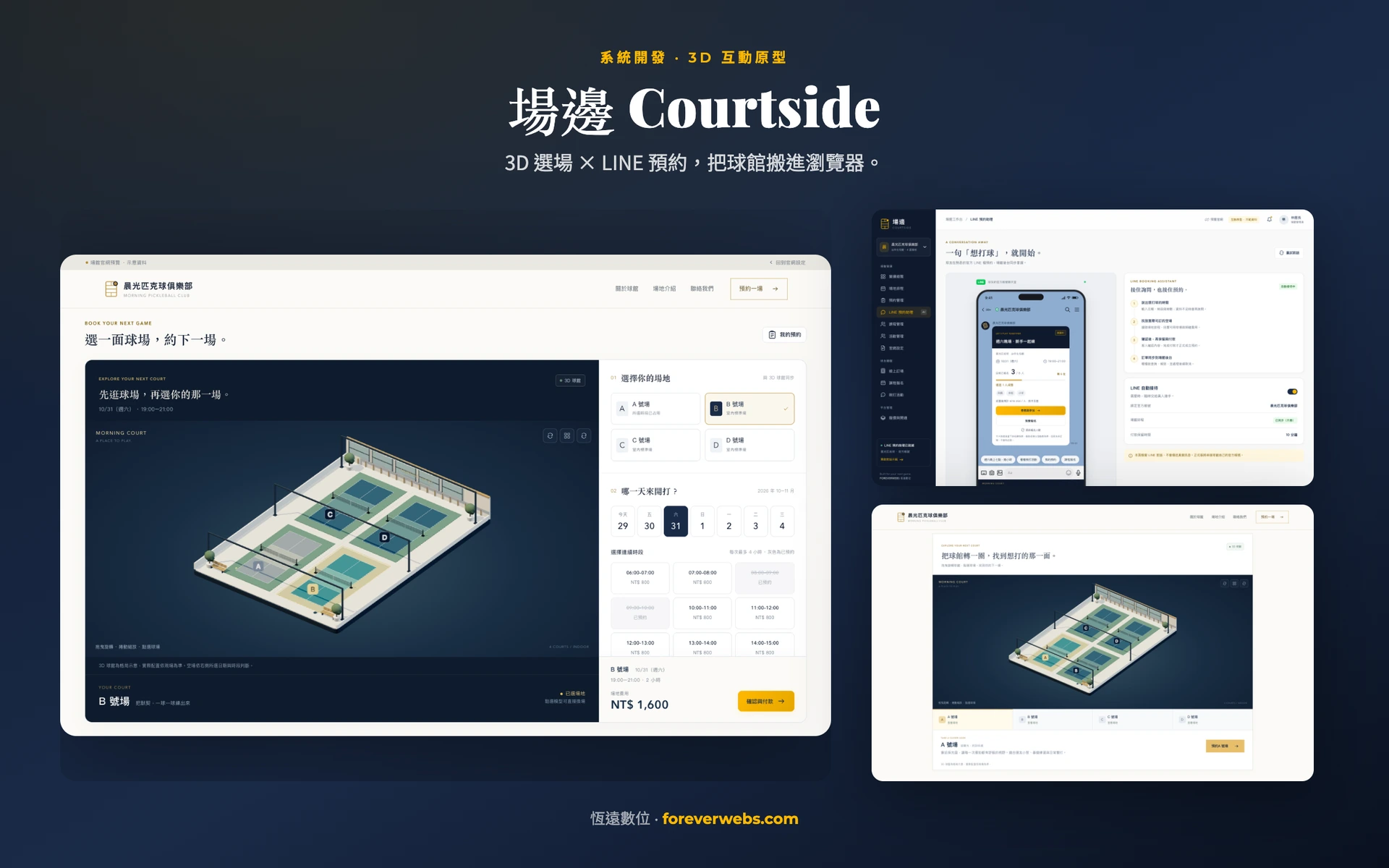
A prototype of booking and venue management software for pickleball. Players pick a court on a 3D model of the venue, and one shared schedule connects booking by chat on LINE, classes, group games and a venue website set up from the back office.
- Demo scenario: a fictional four-court indoor venue (no client)
- Sports venues (pickleball)
- Taiwan
- 2026
- Demo scenario with 4 courts
- Prototype with fictional data; LINE, payments and data sync are simulated
- 4 courts to click in 3D, tied to one shared court schedule
- 3 ways to get on court: court booking, class sign-up and group games
- 1-page venue website, with content set from the back office
Inside the system
We built this prototype in Traditional Chinese, so the screens are in Chinese.
What was getting in the way
- Questions about free courts and booking details are scattered across chat messages, so staff confirm dates, times and prices over and over
- Court bookings, coaching classes and group games are scheduled separately, so it is hard to check court use and open spots at the same time
- Players who want to join a group game cannot see how many have signed up, who is coming or whether the game is on
- The venue needs to present its courts and contact details online, but website content tends to be maintained apart from operating data
How the system solves it
- A LINE chat booking flow that asks for missing details, replies with free courts, confirms the price and creates the order in one sequence
- The 3D court picker connected to a shared schedule check, alongside tools for opening classes, managing student spots, taking attendance and confirming courts for games
- LINE message cards that show a snapshot of sign-ups, a details page that reads the latest spots and listed nicknames, and support for minimum headcounts and waitlists
- A one-page website driven by back-office fields for photos, court descriptions, opening hours and contact details, with a 3D tour of the venue
What is inside
Interactive 3D court picker
A Three.js model of the venue that players can rotate, zoom and click. The model stays fixed on the left while the right column handles court, time and payment, synced both ways so valid time slots and form entries are kept.
Shared court schedule
One demo schedule shows court bookings, published classes and confirmed games, checks for conflicts and frees courts after a cancellation.
LINE chat booking
A chat styled like a LINE official account asks for missing details and confirms free courts and prices, then hands off to booking. It is not yet connected to a real LINE account.
Classes and students
Schedule single or series classes, manage sign-ups, pending payments, waitlists and attendance per session, and check for court and coach conflicts before publishing.
Group games and waitlists
Shows progress toward the minimum, spots left and nicknames players agreed to share, keeps sign-ups separate from court confirmation, and demonstrates filling spots from the waitlist.
Venue website settings
Set the cover photo, court descriptions, opening hours and contact details in the back office, then save and preview the one-page site with its links to booking, classes and group games.
What changed
- Built two-way 3D court picking for 4 courts, with the fixed model and the right-column payment flow, and verified that taken courts are blocked and that bookings, classes and games share one schedule
- Linked a 1-page venue website to 3 entry points (court booking, classes and group games), and verified that back-office settings match the preview
- Completed the LINE booking flow and the message card flows for spots and player lists; a real LINE account and payments can be connected for a specific venue
How the project came together
At a pickleball venue, service often starts with one question: “Any courts free Saturday night?” Court bookings, coaching classes and group games organized among players each have their own time slots and spots. When all of that lives in chat messages and spreadsheets, staff have to confirm the same details again and again, and players cannot easily tell what to do next. So we built Courtside, a prototype of booking and venue management software that turns inquiries, bookings, sign-ups and the venue’s introduction into screens both staff and players can use directly.
The booking page uses Three.js to show a four-court venue that players can rotate and click. The 3D court picker stays fixed on the left, and the right column scrolls on its own, covering the court, date, time slot and payment. Court selection works in both directions (on the model or in the form), keeps time slots that are still valid and anything already filled in, and blocks courts that are taken. The venue website also offers a 3D tour.
The software is shown running a demo venue with four indoor courts. Managers can view each day’s court schedule, book on behalf of customers, record payments, check players in and cancel bookings. Court bookings, published classes and confirmed games all go through the same schedule check, and when a whole booking or game is canceled, its time slots open up again. Players choose a date, a court and consecutive time slots, confirm the price, then complete a demo payment that creates an order.
The LINE booking assistant is styled like a chat with a venue’s official account on LINE, the messaging app most people in Taiwan use. It shows the flow of asking about a time, replying with courts that are free and confirming the booking. Group games are posted as LINE message cards (Flex Messages) that show how many players have signed up, how many spots are left and the minimum needed for the game to go ahead. Tapping through shows the nicknames of players who agreed to be listed. A card that has been sent keeps a snapshot of that moment, and new numbers go out as a new card. Signing up for a group game does not hold a court. Once the minimum is reached, the venue confirms a free court, and only then does the game move on to payment and the rest of the process.
Classes can be single sessions or a series, with coaches and courts assigned, student sign-ups, waitlists that fill open spots, and attendance taken for each session. The venue also gets a one-page website. The cover photo, venue description, court introductions, opening hours and contact details are all set from fields in the back office. After saving, staff can preview the site right away, and visitors can go from the website to court booking, classes and group games.
The demo uses fictional names and venue details. The LINE official account, online payments and syncing data across devices are shown as demo screens. For a real venue, we would confirm how to connect these services, staff permissions and transaction rules based on that venue’s needs.
- TypeScript
Other systems we have built
Want a system like this?
Tell us how your process works today. We will scope a version for your team, with a requirements document, a detailed quote and a timeline.