Our own product
SalesKing: the AI CRM and sales assistant we built and run ourselves
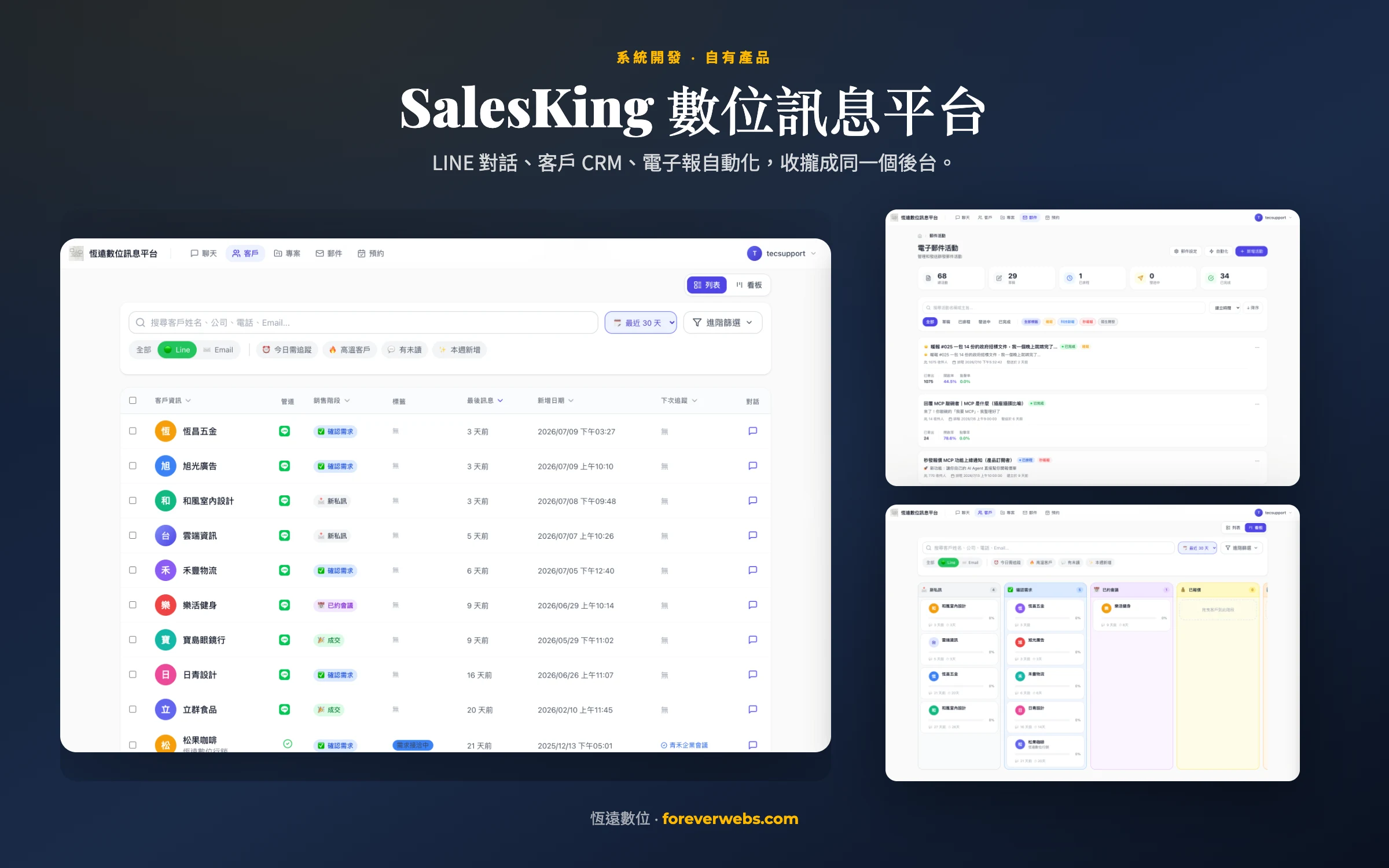
Our sales conversations were in LINE, customer lists in Excel and newsletters in a third tool. We built one back office for all three, with AI that reads conversations and identifies each customer’s sales stage. The contact form on our own website feeds straight into it.
- Our own product, used by our team every day
- Software (our own product)
- 2026
- 37 data models, 31 API routes, about 120,000 lines of code
- 7 months in, still in active development
- 37 data models on one customer record
- 7 AI nodes that read conversations and sales stages
- 20 MCP tools that let AI operate the system
What was getting in the way
- Conversations in LINE, lists in Excel and newsletters in a third tool meant the same customer was recorded in three places
- Sales stages updated by hand drifted out of date, and follow-up timing relied on memory
- Newsletters needed segments, open tracking and automation, but off-the-shelf tools did not talk to our CRM
- We wanted AI to read conversations and draft replies without letting it message real customers on its own
How the system solves it
- The LINE Messaging API connected directly, so messages, customers and projects share one record
- AI reads the whole conversation, identifies the sales stage and drafts a follow-up plan for the salesperson to confirm
- Our own newsletter module, with segments, open and click tracking, automated flows and subscriptions in the same back office
- Fully automatic, semi-automatic and manual modes, with AI replies requiring a person’s confirmation by default
What is inside
LINE conversations in one place
Connected directly to the LINE Messaging API, so messages, images, files and customer data share one record.
AI sales-stage detection
AI reads the whole conversation to judge the sales stage and pick out buying intent and concerns, so nobody has to update the status by hand.
Three automation modes
Fully automatic, semi-automatic and manual. AI-written replies need a person’s confirmation by default, so nothing goes to a real customer by accident.
Newsletter segments and tracking
Tag-based segments, scheduled sends, open and click tracking, automated flows and unsubscribes in the same back office.
Forms, bookings and projects
Public form submissions, bookings, project milestones and payment tracking on the same customer timeline.
MCP server
Our own MCP server and OAuth 2.1, with 20 tools for operating the whole system from Claude.
What changed
- LINE conversations, the CRM and newsletters now live in one back office, with 37 data models on the same customer record
- AI handles seven steps: reply suggestions, conversation analysis, stage detection, journey analysis, follow-up plans, lead research and first contact
- A self-built MCP server (OAuth 2.1) exposes 20 tools, so the system can be operated directly from Claude
How the project came together
SalesKing is a system we use every day, and the reason we built it was practical. Our sales conversations were all in LINE, customer lists sat in Excel, and newsletters went out from yet another tool. The same customer was recorded in three places, and knowing who had followed up on what meant piecing it together from memory. We were stuck in exactly that situation, so we built our own.
First, we connected the LINE Messaging API directly. Messages, images and files from a customer land on that customer’s record, with no matching between LINE and a CRM by hand. Projects, bookings, form submissions and a timeline all grow from the same record: 37 data models on a single customer thread.
Second, AI joined as a decision step, not an auto-reply bot. The rule is to solve with rules whatever rules can solve (tag-based segments, scheduled sends, overdue reminders), and let AI handle only what rules cannot: reading a whole conversation to judge the customer’s sales stage, picking out buying intent and concerns, and drafting replies and follow-up plans. Seven AI nodes each have one job (reply suggestions, conversation analysis, stage detection, sales journey analysis, follow-up plans, lead research and first-contact messages), and their outputs check one another to reduce the risk of any single model getting it wrong.
Automation is deliberately split into fully automatic, semi-automatic and manual modes, and the default is semi-automatic: a person confirms every AI-written reply before it reaches a real customer. We drew that line on purpose, because when an outgoing message is wrong, the customer relationship pays for it.
We built the newsletter module ourselves as well: tag-based segments, scheduled sends, open and click tracking, automated flows and subscription management, sending through Gmail with multiple accounts. Finally, we opened the system as an MCP server with our own OAuth 2.1, exposing 20 tools so Claude can look up customers, send messages and schedule newsletters directly. The contact form on our website feeds into SalesKing, which makes us its first user.
The stack is a React and Vite front end, a Node.js, Express and MongoDB back end, and Socket.io for real-time updates, deployed on Zeabur, with a separate customer portal and a LINE LIFF client.
- React
- Vite
- Node.js / Express
- MongoDB
- Socket.io
- LINE Messaging API
- LINE LIFF
- Gmail API
- MCP
- Zeabur
Other systems we have built
Want a system like this for your team?
Tell us how your process works today. We will scope a version for your team, with a requirements document, a detailed quote and a timeline.